

Hiring a virtual assistant is often seen as the next step once your small business starts getting busier. It’s easy to believe that another pair of hands will solve the problem, but I’ve learned that bringing someone into a business without a few simple systems in place often creates more questions than answers. Instead of saving time, you find yourself answering the same questions, searching for documents you know you created, or explaining your process differently every single time.
That doesn’t mean your business has to be perfectly organized before you ask for help. Far from it. You simply need a few reliable ways of doing the things you already do in your business. Those small changes make it much easier for someone to support you and give your clients a more consistent experience from the moment they reach out.
If you’ve been thinking about hiring a virtual assistant or bringing additional support into your small business, I’d encourage you to spend a little time building these six business systems first. They’re not complicated, require expensive software, or have to be finished in one weekend. They simply give your business a stronger foundation to grow from.
Free Download: Business Systems Checklist
I’ve created a simple Business Systems Checklist to go along with this guide. As you read, you can tick off what you already have, take note of what’s missing, and decide where you’d like to start.
The Lesson That Changed How I Run My Business
When I first started working as a virtual assistant years ago, I didn’t think I needed systems.
No, scratch that.
I didn’t even know what systems were, so why would I think I needed something I didn’t understand? I was simply doing the work. Clients hired me, I delivered what they needed, and then I moved on to the next task.
That worked for a while, but as I started supporting more clients, I noticed I was spending time on things I shouldn’t have done more than once. I’d search through old emails looking for something I’d already written, recreate forms because I couldn’t find the originals, and stop halfway through a task because I couldn’t remember what I normally did next. None of those things seemed like a big deal on their own, but together they made my days far more difficult than they needed to be.
I’ll never forget the day a potential client asked for my intake form. I confidently said I’d send it over, then opened my laptop and realized I didn’t have one ready to go. I’d created one before, but I hadn’t saved it properly, so instead of sending over a link, I found myself building another one from scratch. That was the moment I realized the problem wasn’t my ability to do the job. I just didn’t have a consistent way of doing it.
Once I started putting simple systems in place, everything became easier to manage. I wasn’t constantly retracing my steps, my clients received the same thoughtful experience every time, and I finally had routines I could rely on instead of trying to remember every little detail. Looking back, I can honestly say those small changes made a much bigger difference than I expected, and they’re the same reason I encourage business owners to build a few essential systems before hiring support.
What Are Business Systems?
Don’t let the name intimidate you because it’s much simpler than it sounds.
A business system is just a repeatable way of doing something. It could be how you welcome a new client, send an invoice, organize your files, manage your projects, or publish content. If you’ve ever caught yourself thinking, “How did I do this last time?” that’s usually a sign that a simple system would make life much easier.
The goal isn’t to make your business feel rigid or robotic. It’s to stop reinventing the wheel every time the same task comes around, so you can spend more time serving your clients and less time trying to piece things together.
Before we get into each one, here’s a quick overview of the six business systems we’ll cover.
| Business System | Why Its Important |
| Client Onboarding | Gives every client a consistent and welcoming start. |
| Project Management | Helps you keep track of tasks, deadlines, and priorities. |
| Payments & Invoicing | Makes it easier to bill clients and keep up with payments. |
| File Organization | Helps you find what you need without wasting time searching. |
| Content Management | Gives you a simple routine for creating and sharing content consistently. |
| SOPs | Makes it easier to hand tasks over without explaining everything from the beginning. |
As you read through each section, keep your Business Systems Checklist nearby. You don’t need to fix everything today. Use it to make notes, spot the gaps, and decide which system you’d like to improve first. By the time you finish this guide, you’ll have a much clearer picture of where your business stands and what to tackle next.
1. Client Onboarding System
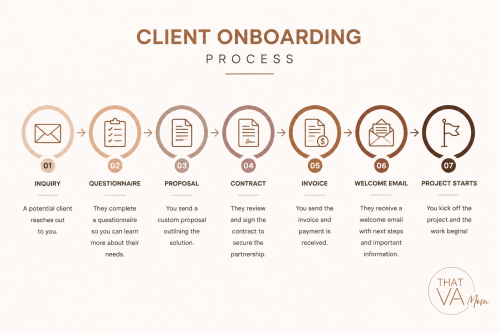
If there’s one system I’d encourage you to put in place first, it’s this one.
Your onboarding system is everything that happens between someone saying, “I’d like to work with you,” and the day you begin working together. It includes how enquiries come in, how you respond, how they book and pay, the information you collect, and how you welcome them into your business.
When those steps are the same for every client, people know what to expect, and you know exactly what needs to happen next. It also makes life much easier when you eventually bring someone in to help because they can follow a process instead of asking questions every step of the way.
You might need to improve this system if:
- You answer the same questions for almost every new client.
- Every client starts differently.
- You forget to send important information.
- You’re searching through old emails to copy what you sent someone else.
If any of those sound familiar, don’t be discouraged. Every business starts somewhere, and this is one of the easiest systems to improve.
Helpful tools
You don’t need every tool on this list. Even a simple questionnaire, a welcome email, and a clear onboarding process can make a very noticeable difference.
Your Action Plan
Use the Client Onboarding section of your checklist to write down every step that happens after someone contacts you about working with you. Start with your first reply and finish with your welcome email or first meeting. Don’t worry if there are gaps or if the process feels untidy. That’s exactly what the checklist is there to help you uncover.
2. Project Management System
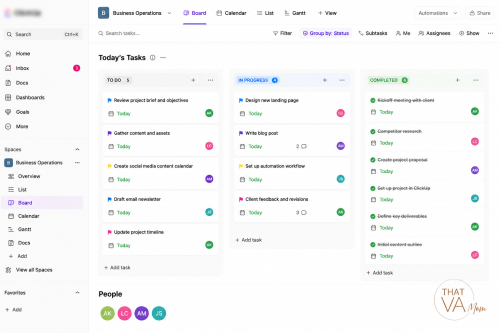
Once a client is onboarded, you need one place to keep track of everything that follows.
Your project management system is where your tasks, deadlines, notes, and client work are organised. It shouldn’t be spread across emails, WhatsApp chats, sticky notes, and random notebooks. Having one central place makes it much easier to see what’s been done, what’s waiting, and what needs your attention next.
It also gives anyone supporting you a clear picture of what’s happening without having to interrupt you throughout the day.
You might need to improve this system if:
- You forget tasks until someone reminds you.
- You’re not always sure about what should be handled first.
- Client information is scattered across different apps.
- You spend too much time looking for updates instead of making progress.
Helpful tools
Don’t feel pressured to use the same software everyone else is using, or worse, chase after every “popular” tool. A tool is only helpful if you’ll actually stick with it.
Your Action Plan
Use the Project Management section of your checklist to review how you’re currently keeping track of your work. Then ask yourself one simple question:
If someone were to join my business tomorrow, would they know where to find every task they’re responsible for?
If the answer is no, that’s a great place to begin. Choose one project management tool and commit to using it consistently before trying anything more advanced.
3. Payment and Invoicing System
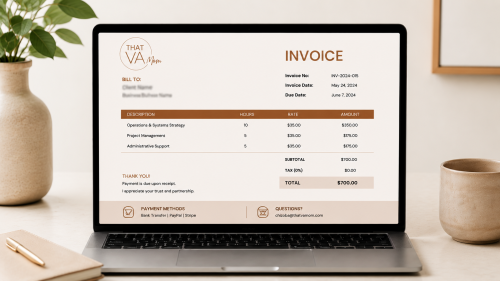
Getting paid should be straightforward for both you and your clients.
A reliable payment system makes it easy to send invoices, track payments, and follow up when necessary. It also gives your clients confidence because they know exactly how and when to make payment.
You might need to improve this system if:
- You create every invoice from scratch.
- You’re unsure which invoices have been paid.
- Clients regularly ask how they should pay you.
- You remember to send invoices days after completing a project.
Helpful tools
Choose the platform that works best for your business and the customers you serve. There’s no prize for using the most popular tool.
Your Action Plan
Turn to the Payments section of your checklist and review your current process. Can a new client clearly see how to pay you? Do you already have an invoice template ready to use? If not, that will be your next task. Creating one template today will save you from repeating the same task over and over again.
4. File Organisation System
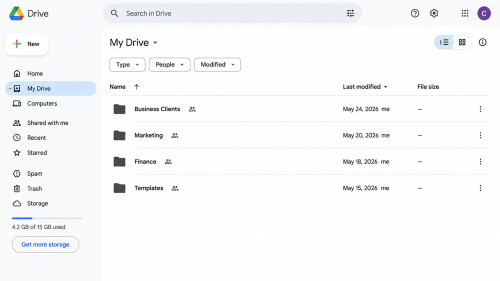
You shouldn’t have to stop what you’re doing just to search for a document you know you’ve already created.
Your contracts, templates, client files, graphics, invoices, and business documents all deserve a place where they’re easy to find. The goal isn’t to create the perfect folder structure. It’s to create one that makes sense to you and can easily be understood by someone supporting your business, whether they’re a virtual assistant, employee, or contractor.
You might need to improve this system if:
- You search for the same files repeatedly.
- You have several versions of the same document.
- Your Downloads folder has become your filing system.
- You sometimes create a new file because you can’t find the original.
Helpful tools
Choose one place to keep your business files instead of spreading them across different locations.
Your Action Plan
Turn to the File Organisation section of your Business Systems Checklist and list the main folders your business needs. A simple structure is more useful than a complicated one you’ll never maintain. Once you’ve listed them, spend fifteen minutes creating those folders before moving on with your day.
5. Content Management System

Creating content shouldn’t feel like you’re starting from the beginning every time you open your laptop.
A content rhythm is simply a routine that helps you capture ideas, plan ahead, and publish consistently without scrambling for something to say at the last minute. It doesn’t have to be complicated, and it certainly doesn’t mean posting every day. The best rhythm is the one you can keep up with.
If you’ve ever had a great idea while cooking, driving, or talking to a client, only to forget it later, you’ll understand why having a simple process is important. Good ideas don’t usually show up when you’re sitting down to create content. They appear throughout your day, and your job is to have somewhere to keep them until you’re ready to use them.
You might need to improve this system if:
- You only think about content when it’s time to post.
- You have lots of ideas, but nowhere to save them.
- You disappear for weeks because you don’t know what to share.
- Creating content always feels rushed.
Helpful tools
The software doesn’t make you consistent. Your routine does.
Before moving on, spend a few minutes completing the Content Rhythm section of your checklist. Write down how you currently plan your content and choose one small improvement you can make this week. It might be keeping an ideas list on your phone, planning one week ahead, or setting aside an hour from a single day every week to prepare your content. Keep it simple. The goal is to create a routine you’ll actually stick to.
6. Standard Operating Procedures (SOPs)
People often hear the words Standard Operating Procedures and imagine a thick manual sitting on a shelf somewhere.
That’s not what I’m talking about.
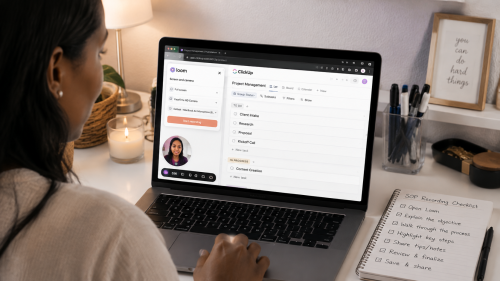
An SOP is simply a written record of how you complete a task. It could be a checklist, a Google Doc, a short screen recording, or even a voice note. The format isn’t what’s important. What’s important is that the next time the task needs to be done, you don’t have to rely on memory or explain it all over again.
Some of the first SOPs you could create are:
- How to onboard a new client.
- How to send an invoice.
- How to answer customer enquiries.
- How to publish a blog post.
- How to schedule social media content.
- How to close out a completed project.
You don’t need an SOP for every part of your business today. Start with the tasks you repeat most often and build from there.
You might need to improve this system if:
- You explain the same task repeatedly.
- You forget small but important steps.
- You avoid delegating because it feels quicker to do everything yourself.
- Taking a day away from your business feels impossible.
Helpful tools
When you get to the SOP section of your checklist, write down three tasks you repeat every week. Pick just one and document it the next time you do it. Don’t aim for perfection. Aim for useful.
Do These Systems Have to Be Perfect Before You Hire?
No.
The purpose of building these systems isn’t to create a perfect business before you ask for help. It’s to give someone enough direction so they can confidently support you, rather than waiting for instructions at every step.
You don’t have to finish all six before hiring a virtual assistant. Even putting a few of them in place will make the experience smoother for both of you. Start with the area that’s causing you the most frustration, improve it, then move on to the next one.
Before You Hire a Virtual Assistant: FAQs
Do I need business systems before hiring a virtual assistant?
No. Your business doesn’t have to be perfectly organized before you hire a virtual assistant. Most businesses aren’t.
What helps is having a simple way to handle the tasks you plan to hand over. That could be how you welcome new clients, keep track of projects, send invoices, or organize your files. It doesn’t have to be complicated, but it should be clear enough that someone else can follow it without you having to explain every step from the beginning.
That’s exactly why I recommend building these systems first. It makes bringing in support much easier for everyone involved.
What business system should I create first?
Start with your client onboarding system. Every new client goes through it, so even a few improvements here can make a noticeable difference. Once that’s in place, move on to your project management system and your SOPs.
Can a virtual assistant help me set up business systems?
Yes, depending on the type of support they provide. Some virtual assistants focus on completing tasks, while others also help organize workflows, document processes, create SOPs, and improve the way your business operates.
Do I need expensive software to build business systems?
Not at all. Many business owners build their first systems using tools they already have, such as Google Drive, Google Docs, Google Forms, or a spreadsheet. Software can make things easier, but it isn’t where good systems begin.
How do I know if my business is ready to hire a virtual assistant?
A good sign is when you have recurring tasks, know how you want those tasks completed, and are ready to hand them over. If you’re still figuring out the process yourself, spend a little time creating a simple routine first. It will make working with a virtual assistant much easier.
Conclusion
Hiring a virtual assistant can be one of the best decisions you make for your business, but the real value comes from giving that person something clear to work with.
You don’t need perfection. You don’t need fancy software. You don’t even need to finish every system in this article before you ask for help. What you do need is a simple way to handle the tasks that come up every day so you’re not starting from scratch each time.
Pick one system, improve it, then come back for the next. Those small changes have a way of making everyday business feel much easier to manage.
Your Next Best Step
Now it’s your turn.
Download the Business Systems Checklist and use it as you review each area of your business. By the time you’ve finished, you’ll have a much clearer picture of what’s already working well and what you’d like to improve next.
If you’d like someone to help you put those systems in place, the next step is completing my Business Support Questionnaire. Once you’ve submitted it, you’ll be able to book a Business Support Call to talk through your business and decide what kind of support would be most helpful.
If you’re not ready for that just yet, that’s perfectly okay. Start with the checklist, work through one system at a time, and come back whenever you’re ready.
Save This for Later
You don’t have to tackle all six systems today.
Save this guide to Pinterest so it’s easy to come back to whenever you’re ready to work on the next one. If you know another business owner who’s thinking about hiring support, send it their way too. It might save them from learning these lessons the hard way, just like I did.